
An honest take on Sigma vs. Databricks AI/BI
July 2, 2026
Sigma Training & Enablement
July 20, 2026The Ten-Minute Trick That Makes Your Sigma App Feel More “App-like”
Your user clicks a button. Behind that button, an action sequence kicks off: an insert to an input table, a refresh of three dependent elements, a navigation to the next step. Total runtime, maybe five or six seconds. And what does the user see during those five or six seconds?
A thin blue loading bar crawling across a table they may not even be looking at.
That’s all the feedback Sigma gives by default. Users may sit there wondering “did that work?” and, if they’re impatient, they might click the button again. Now you’ve got a duplicate insert to clean up. I’ve watched this happen in UAT numerous times, and I was more than a little giddy when I stumbled onto this fix. And it only takes about ten minutes to build.
Why this happens
This isn’t a Sigma bug. Sigma’s default feedback (the loading indicator on each affected element) is element-level, not workflow-level. Nothing tells the user “hang on, a multi-step process is running.” The platform is doing exactly what it should. It just isn’t narrating.
So we make it narrate. And the way we do it is almost embarrassingly simple.
The trick: a loading modal
The whole pattern is five steps:
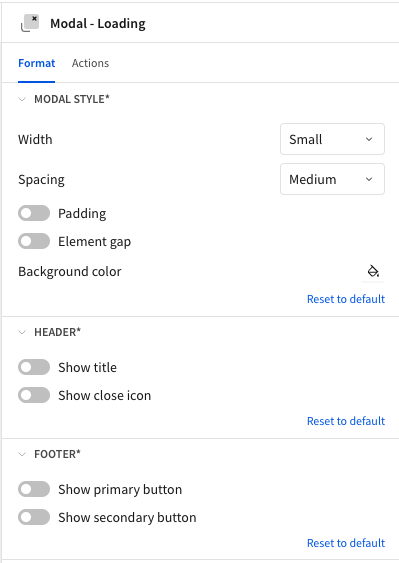
- Add a modal to your workbook (Figure 1). Then strip it down to nothing. In the modal’s Format panel, turn off Show title and Show close icon in the Header section, and turn off Show primary button and Show secondary button in the Footer section. If the user can close the modal mid-sequence, they will, so remove every way to dismiss it.
- Find or make an animated loading gif (Figure 2). Grab one from a free gif site, or spend five minutes in Canva making a custom one with your client’s branding. (Do the Canva version. A branded loading animation makes the whole app feel more polished than it has any right to, and it’s the most fun five minutes of the build.)
- Drop an image element into the modal and upload the gif. Add a text element too if you want depending on which gif you choose (“Saving your changes…” goes a long way).
- In your action sequence, put an Open modal action at the very beginning, pointed at your loading modal.
- Put a Close modal action at the very end.
That’s the entire trick. The modal opens the instant the sequence starts and closes itself when the last action completes. No timers, no state management, no cleverness. The action sequence handles all the timing for you.

A real example
Here’s the sequence I use constantly in input table workflows (Figure 3):
- Open modal (the loading modal)
- Insert or update the input table row
- Refresh the dependent elements that read from that input table
- Navigate to the next step in the workflow
- Close modal

Steps 2 through 4 are the actual work, and they’re the slow part. The user never sees any of it. They see a branded “Saving…” animation, and then they’re on the next page with fresh data. From their side, it feels intentional and fast, even though nothing about the underlying runtime changed. That’s my favorite part of this trick: you didn’t make anything faster. You just made the waiting feel like part of the show.
Where I use this
Anywhere an action sequence takes more than about two seconds. Quick hits to get you thinking:
- Input table inserts and updates
- API calls through the Call API action (external services take however long they take, and you have zero control over it)
- Any sequence chaining three or more actions together
My rule at this point: if it writes data and then navigates, it gets a loading modal.
The bigger picture
Sigma is turning more and more toward AI Apps, and apps built in Sigma need to start behaving like actual apps, not dashboards with buttons bolted on. I’ve collected a handful of tricks like this one to give the end user a more authentic app experience, and this is one of my favorites because of how easy and effective it is. Real apps never leave you guessing whether your click did something. Neither should yours.
Contact Us
If you would like to talk to someone at Maverick Data about maximizing your usage of the Sigma platform, please email us at spencer@maverickdata.io for more information!