
How Sigma’s AI Apps Are Changing BI
December 14, 2025
Scrolling Headers in Sigma
December 20, 2025AI Licensing Tiers in Sigma
…and how to assign them appropriately
As we discussed in our previous blog on AI Apps in Sigma, one of the many reasons Maverick Data is fully committed to Sigma is its alignment with the modern AI roadmap and native AI integrations.
As soon as teams start exploring AI within Sigma, the next question that inevitably comes up is: who actually gets access to what?
In Sigma, AI capabilities aren’t a one-size-fits-all feature. They’re tied directly to user roles and licenses – and understanding that distinction is critical for correctly empowering and scaling AI usage.
Basic Sigma Licensing
Similar to other BI tools, Sigma ties license tiers to account types, each reflecting what a user can do within the platform. Licensing should reflect each team’s delivery needs – and not everyone needs access to all data and all capabilities in Sigma. The standard license tiers are listed below:
| License Tiers | Capabilities |
|---|---|
| View | View users can consume dashboards and reports shared with them. This role is designed for users who need fast answers without modifying data or content. |
| Act | Act users can interact with content beyond viewing, including filtering, exporting, and contributing limited inputs where enabled. |
| Analyze | Analyze users can explore data more deeply by asking questions, slicing metrics, and performing ad-hoc analysis within governed datasets. |
| Build | Build users can create, modify, and publish datasets, dashboards, and AI-powered workflows. This role is typically for BI developers who are designing, building, and scaling analytics and AI Apps |
If your organization is using the Lite, Essential, and Pro licensing tiers, please find a breakdown of those license tiers below:
| License Tiers | Capabilities |
|---|---|
| Lite | The Lite tier provides core Sigma functionality for viewing and basic exploration of data. It is designed for less robust teams that prioritize dashboard consumption |
| Essential | Act users can interact with content beyond viewing, including filtering, exporting, and contributing limited inputs where enabled. |
| Pro | Analyze users are typically power-users who want to explore data more deeply by asking questions, slicing metrics, and performing ad-hoc analysis within governed datasets. |
Account types determine permissions and thus the license tier assigned for billing and access control. You can also create custom account types to fine-tune permissions for unique roles.
Default AI Capabilities in Sigma
Sigma includes several AI capabilities that are available by default in the platform. These features are designed to be easy to use and apply – whether that’s understanding a chart, writing a formula, or exploring data without requiring custom models or complex setup. See examples of these default capabilities below.
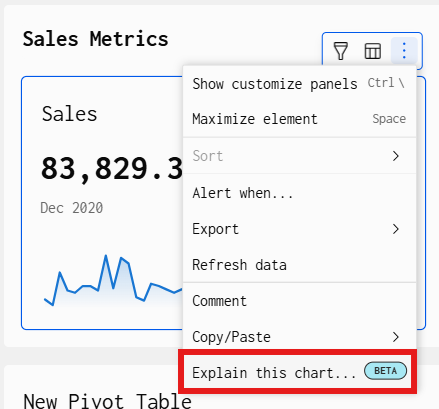
Explain this Chart
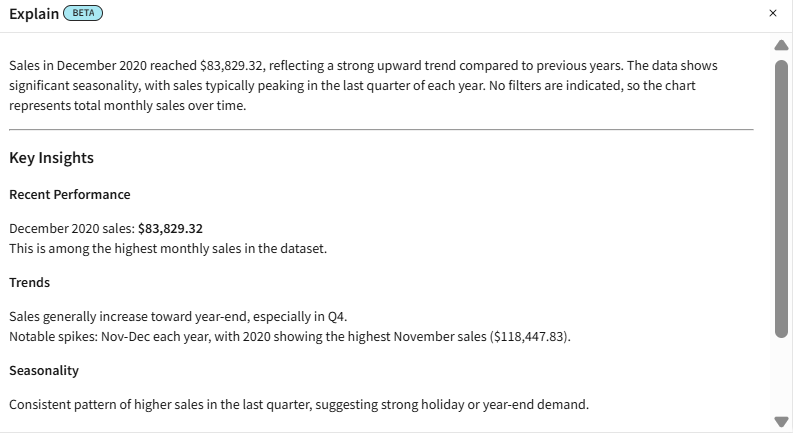
This feature allows users to click on the top right of dashboard elements and receive an explanation of what is going on the background of the data in that visual.
You can see an example of that output below.
AI Write Formula
This capability allows users to describe calculations in natural language and have Sigma generate the corresponding formula. See the example below where a prompt is given to write a YTD calculation, and Sigma produces the syntax.

Ask Sigma
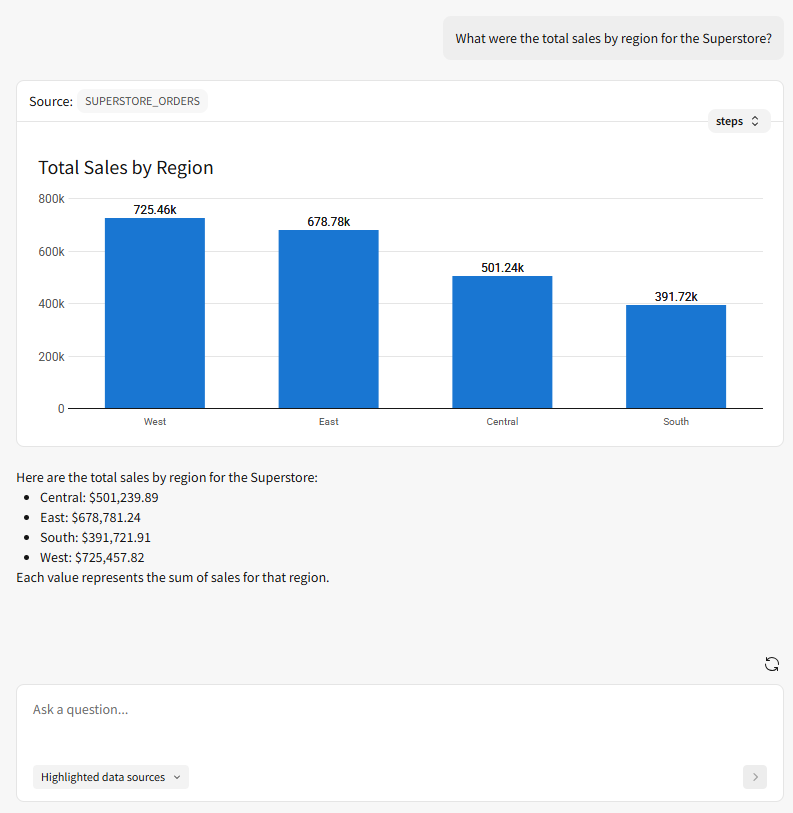
Ask Sigma allows users to ask questions about their data using plain language and receive visual, query-backed results. It enables faster exploration for business users while still respecting data permissions and governance.
AI Capabilities by License Type
While Sigma’s licensing model defines what users can do in the platform, it also determines how — and if — users can interact with AI. Some licenses are designed primarily for consuming AI-generated insights, while others enable users to actively explore data with AI or even build AI-powered workflows.
Understanding these differences is key to scaling AI responsibly without over-licensing or creating governance issues.
| Capabilities | View | Act | Analyze | Build |
|---|---|---|---|---|
| Explain charts with AI Use AI to instantly generate a description of any chart. | ❌ | ✅ | ✅ | ✅ |
| Use AI with formulas Use the formula assistant to write new formulas, correct formula errors, and explain existing formulas. | ❌ | ❌ | ✅ | ✅ |
| Use Ask Sigma Access and use Ask Sigma to ask natural language queries | ✅ | ✅ | ✅ | ✅ |
If your organization leverages the Lite, Essential, and Pro licensing tiers, please find the correct breakdown below:
| Capabilities | Lite | Essential | Pro |
|---|---|---|---|
| Explain charts with AI Use AI to instantly generate a description of any chart. | ❌ | ✅ | ✅ |
| Use AI with formulas Use the formula assistant to write new formulas, correct formula errors, and explain existing formulas. | ❌ | ❌ | ✅ |
| Use Ask Sigma Access and use Ask Sigma to ask natural language queries | ✅ | ✅ | ✅ |
Wrap-Up
AI in Sigma isn’t something you simply turn on and hope for the best. The value comes from intentionally aligning AI capabilities to the right users, with the right level of access, and the right guardrails in place.
Sigma’s licensing model makes that possible by design. When licenses are assigned thoughtfully, teams can move beyond static dashboards and start embedding AI into real workflows — empowering builders to create, enabling analysts to explore, and giving decision-makers faster, clearer insight without sacrificing governance.
Contact Us
If you would like to talk to someone at Maverick Data about maximizing your usage of the Sigma platform, please email us at spencer@maverickdata.io for more information!