
Getting Started with Input Tables in Sigma
February 8, 2026
Scatterplot Aggregations in Sigma
February 21, 2026Want to get started building AI Apps in Sigma? We got you.
AI Apps can mean many things to many people, so in this blog we’re going to define AI Apps the same way that Sigma does: Purpose-built solutions that connect directly to your data platform to seamlessly integrate live data, workflows, and user inputs.
The idea of building an “AI App” might seem daunting if you’re coming from a legacy no/low-code background – but no worries, this blog will help you understand just how easy it is to do in Sigma
What Makes an AI App, An AI App?
For those coming from legacy BI – static consumption of data is standard. The process always went something like this:
- Data is loaded to a CDW via an ETL process
- A semantic model is created in your legacy BI tool – most often imported or extracted into that tool’s caching layer
- Visuals, tables, and calcs are defined in the BI tool
- Users view that report or dashboard and gain (or don’t gain) the insights needed to do their job or work process better
This is how BI worked for a decade (if not longer) – but not anymore.
Sigma has completed shifted the norm in BI from the static consumption of data to dynamic consumption of data. Let us show you how!
Dynamic Consumption of Data
Sigma enables the shift from static consumption to dynamic consumption of data with three main features:
- Input Tables
- AI integration
- Actions
Input Tables
Think about your most common method of consuming data – your smart phone – and how you use it in your day-to-day life. From passwords to login, to text messages, or prompts in ChatGPT – you are always providing inputs for a better defined output.
If you haven’t viewed our blog post on Getting Started with Input Tables – this is a good place to start with the fundamentals of Input Tables.
The TLDR of Input Tables is that they enable users to directly input data into your Sigma dashboards that is stored in your CDW. This short cuts the legacy BI process of needing to extract data from a source system and loading into a central repository – Sigma becomes your data source.
AI Integration
One of the joys of Sigma is the ability to leverage LLMs from your CDW directly from the Sigma interface. If this is of interest to you – our blog on creating a Sigma AI App to automate SEO blog content generation is a must-read for you!
There are functions in Sigma that you can use just like any other Sigma function to leverage the power of your CDW’s LLMs such as Snowflake Cortex AI functions for text analysis, sentiment detection, translation, and summarization directly within your data models. Please find an example function below!
SnowflakeCortexComplete( “mistral-large2”, “Analyze this customer feedback and categorize the main complaint: ” & [Customer Feedback Text] )
Since we’re pulling data from our CDW as well as entering data to our CDW directly from Sigma, we can also use our CDW AI capabilities on data from Input Tables. This results in a tightly integrated ecosystem that enables live data inputs and AI analysis of those inputs.
Actions
Now that we know that we can input data directly to our CDW as well as run LLMs on top of both CDW and inputted data directly via Sigma – now we need to enable interactions with both of functionalities that make sense in terms of our user’s workflows.
Actions in Sigma bridge the gap between analysis and execution by enabling write-back operations and external function calls directly from your workbooks. You can configure Actions to execute when buttons are clicked, when specific conditions are met, or when users modify Input Table values.
The most common use cases fall into two categories: write-back operations to your CDW (updating or writing back data) and triggering external processes (sending Slack notifications, creating Salesforce tasks, kicking off dbt jobs, calling custom APIs). When combined with Input Tables and AI integration, Actions complete the picture of dynamic data consumption – users input data, AI analyzes it, and Actions operationalize the results, all within a single Sigma workbook.
Putting Together the Piece of an AI App
So far we’ve laid out the pieces to the AI App puzzle – now let’s start connecting some of the dots. Let’s start with the use case that we’re solving.
The use case at hand is a CRM app that we built for our Sigma demos. The page below is where a sales rep would tracker their activities.
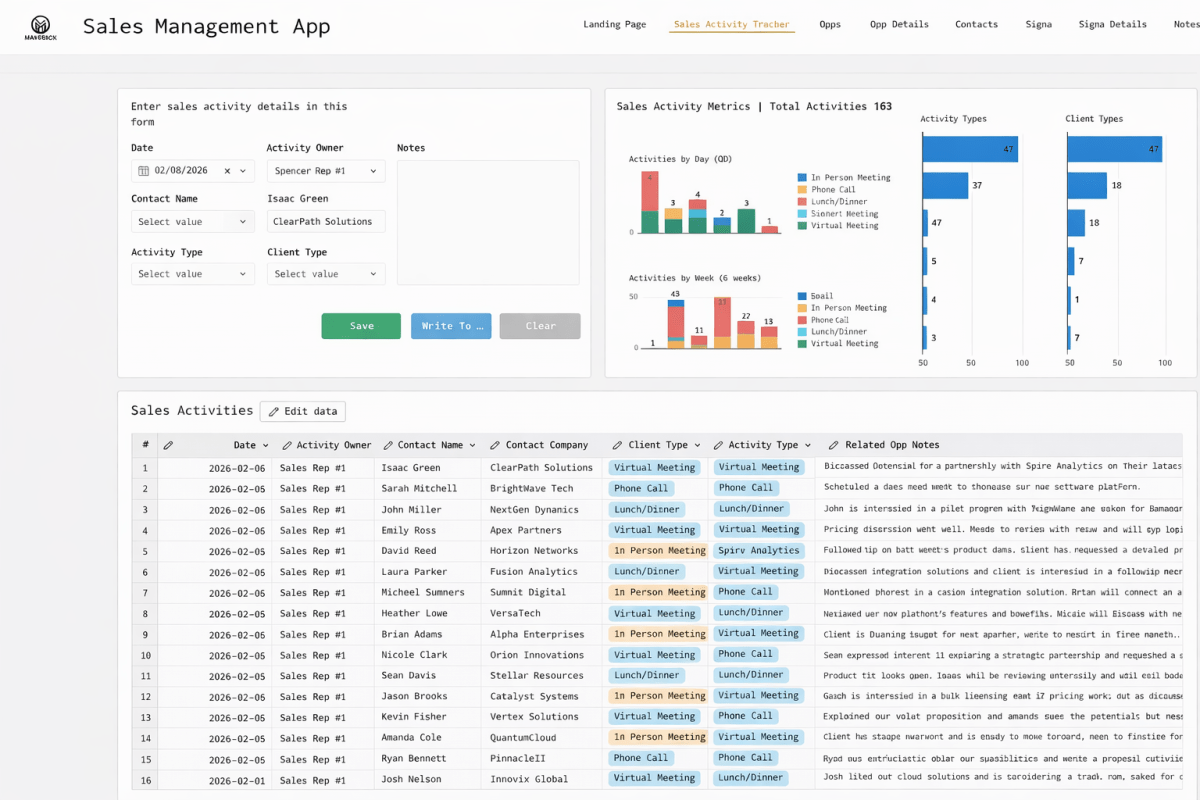
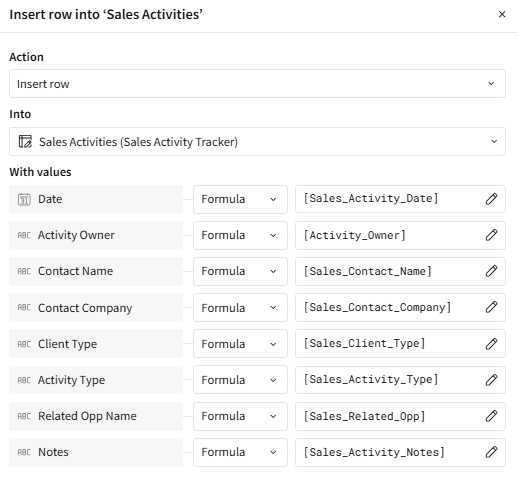
First, we build the blank Input Table to house the columns that we were looking to update. Secondly, we created the Controls needing to be populated for the Input Table. Lastly, we created an Action that inserted the Control value as a formula to the Input Table.
Now to bring in our AI integrations, we populated a Snowflake table with transcript data from our sales calls. In our CRM App we then populate a part of the page with a summary of our last call with a specific person.
To do this, we use a control to filter our Fireflies data source down to just conversations with the person we want to review conversations with. Then we provide a Text Area Control to enter our prompt named Sigma_Fireflies_Question. Finally, we used this calculation below to return the text values.
AggText(“AI_AGG”, [FIREFLIES_PARTICIPANTS_JOINED/Text], [Sigma_Fireflies_Question])
See the output example below.

We’ve now created an AI App with all three elements we mentioned in the intro – Input Tables, AI Integration, and Actions.
If you want a more in-depth walk through of an AI App that we’ve built at Maverick Data – make sure to read the blog post from Mike O’Toole on building a weekly status report using Sigma AI Apps.
The final prompt
See – that wasn’t that bad! AI Apps can be intimidating, but hopefully this blog helped lower the barrier of entry for you to the world of AI Apps in Sigma. By combining Input Tables, AI integrations, and Actions, Sigma makes it possible to make the organizational shift from the static of consumption to the modern world of dynamic data consumption.
Contact Us
If you would like to talk to someone at Maverick Data about maximizing your usage of the Sigma platform, please email us at spencer@maverickdata.io for more information!